What if subject registration would feel nice?
tl;dr: This is how I built the Schedule Builder and how you can do this as well.
Schedule Builder is a webapp that lets CS students from ELTE University plan their class schedule well ahead of registration with nice UI, making the whole process actually bearable.
Key features:
- Seeing class data (day, time, location, group number) in advance 🙃
- Calendar UI that lets you smoothly arrange your classes
- Export to Google Calendar
- Share your schedule
- Search by subject code (basically tanrend but ahead of time)
Check it out if you haven’t seen it yet: schedule.w04m1.dev
For those outside the university, use these subject codes to play around: DEMO-1, DEMO-2
Now let’s jump back in time a bit. One year ago, during the holidays, I started thinking about the upcoming semester — what’s the best way to plan it and which subjects to pick.
We (CS students) all know about the tanrend website, where we can check subject schedules for the upcoming semester. However, the problem is that the schedule is usually not available very far in advance.
But what if I told you that it’s there, available much earlier than we are allowed to see it?
When we type in the search parameter (subject code, in our case), there’s a request to a URL that looks like this:
https://tanrend.elte.hu/tanrendnavigation.php?f=2025-2026-1&m=keres_kod_azon&k=SUBJECT_CODE
It looks typical: the “f” parameter stands for the term of the search. In the above example, it is the 1st term of the 2025–2026 year. But what would happen if, for example, we changed the value from 2025-2026-1 to 2025-2026-2?
Yes, I was as surprised as you are: you actually get data from the next term (of course, if it exists). To put it simply: the only thing hiding the data was the absence of a button on the frontend.
That’s how the first solution was built — Schedule Hack. Lame name, I know; I didn’t plan to share it with anyone except my friends.
It’s a Chrome extension/Tampermonkey userscript that adds one more option to the term selection dropdown. It has two iterations that differ only in the logic for calculating the next term: the first one does it based on date and time, and the second one based on tanrend’s content.
This solution was better than nothing, but still didn’t feel convenient enough. Going back and forth, putting classes into an Excel spreadsheet or calendar, and editing endlessly wasn’t fun. So, I decided to develop it into something much nicer.
Initially, I had several approaches in mind:
- Telegram bot — more than half of people sadly don’t know what Telegram is, so not an option.
- Desktop app — native development would consume too much effort, and an Electron app is just a website, so why not make it a website?
- Web app — yep, sounds like a good idea.
At first, I thought this would be a static website and all the requests would be made from the client. However, tanrend has security headers, so a simple but necessary server-side component was needed.
I settled on Svelte 5 for the frontend and Express.js for the server side. I won’t dive into the frontend part because (i don’t like frontend) you can experience it yourself.
The only thing I want to mention is Schedule-X, very versatile JS calendar compatible with multiple frameworks
The backend, on the other hand, has three simple but important features:
- Proxy — as mentioned earlier, tanrend didn’t allow a client-only setup, so the server acts as a middleman between users and tanrend.
- Caching — since it’s only computer science students and the schedule isn’t updated often, I added simple caching to a SQLite database (could’ve used Redis, but honestly, the load doesn’t justify another container).
- Serving the website itself.
For deployment, I use Coolify hosted on my server. On each pull request, it deploys a dev instance of the website. After testing, I merge the changes, and a new version is shipped to production.
To conclude, I’d like to share some statistics from the last year (covering 2 registration periods). Initially, this website was made for me and my friends, but after confirming it works correctly and simplifies the process, I decided to share it with everyone.
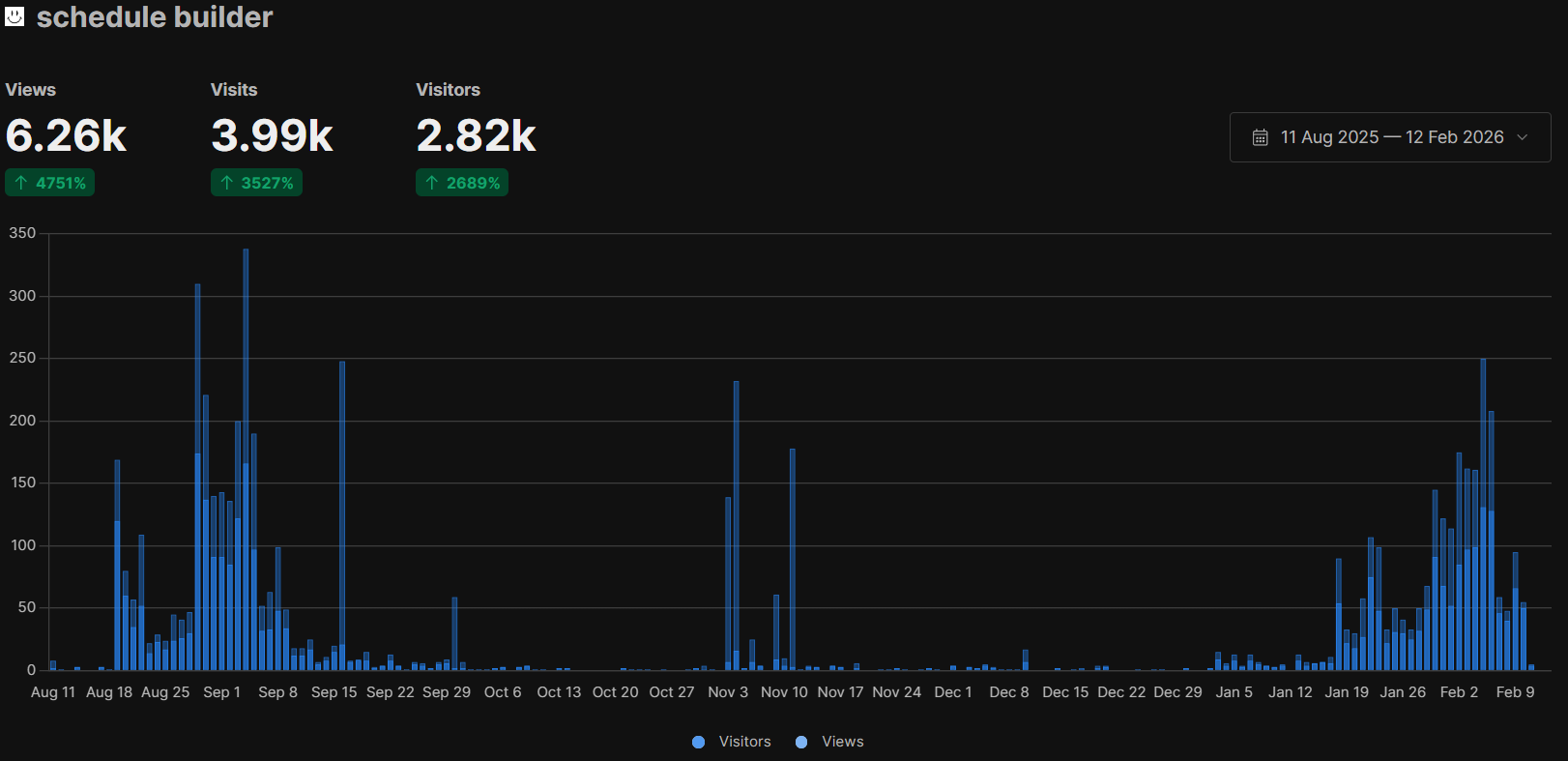
Oh, and the statistics above were gathered using Umami, if you want hassle-free tracking, it’s a great option.